Welcome!

By registering with us, you'll be able to discuss, share and private message with other members of our community.

SignUp Now!

BIOS Dell XPS 13 9340 JDP30 LA-L723P

Laptops and Desktop Bios, Schematic and Boardview Files And Repairing Discussion
Hello everyone,

I have a Dell XPS 13 9340 (Intel Core Ultra) that is stuck at the XPS logo screen.

Current symptoms:

  • Stuck on the XPS logo indefinitely.
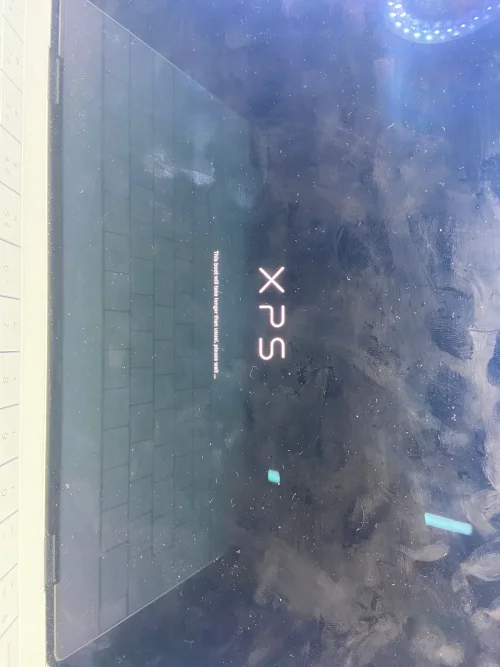
  • Message displayed: "This boot will take longer than usual, please wait..."
  • F2 BIOS Setup does not work.
  • F12 Boot Menu does not work.
  • Removing the SSD makes no difference.
  • The system behavior remains exactly the same without the SSD installed.

What I have already done:

  • Read and backed up all SPI chips from the motherboard.
  • Main BIOS dump: 64 MB.
  • UTS1 dump: 1 MB.
  • UTS2 dump: 1 MB.

I also extracted the official Dell BIOS package version 1.26.0 and obtained:

  • System BIOS with BiosGuard v1.26.0 (32 MB)
  • Intel Management Engine Corporate Firmware Update v18.0.18.2659 (11.8 MB)

The official files appear to be valid.

Could someone please check the 64 MB dump and determine:

1. Whether the BIOS region is corrupted.
2. Whether the Intel ME region is damaged or requires cleaning.
3. If the BIOS needs to be rebuilt using the official Dell BIOS v1.26.0.
4. If NVRAM corruption could be causing the boot hang.
5. Whether the Service Tag, UUID, and OEM data should be transferred into a rebuilt image.

My goal is to obtain a repaired/rebuilt 64 MB BIOS image while preserving the machine-specific data.

Thank you very much for any help.
 

Attachments


BIOS DELL XPS.bin
64 MB · Views: 0

Hello everyone,

I have a Dell XPS 13 9340 (Intel Core Ultra) that is stuck at the XPS logo screen.

Current symptoms:

  • Stuck on the XPS logo indefinitely.
  • Message displayed: "This boot will take longer than usual, please wait..."
  • F2 BIOS Setup does not work.
  • F12 Boot Menu does not work.
  • Removing the SSD makes no difference.
  • The system behavior remains exactly the same without the SSD installed.

What I have already done:

  • Read and backed up all SPI chips from the motherboard.
  • Main BIOS dump: 64 MB.
  • UTS1 dump: 1 MB.
  • UTS2 dump: 1 MB.

I also extracted the official Dell BIOS package version 1.26.0 and obtained:

  • System BIOS with BiosGuard v1.26.0 (32 MB)
  • Intel Management Engine Corporate Firmware Update v18.0.18.2659 (11.8 MB)

The official files appear to be valid.

Could someone please check the 64 MB dump and determine:

1. Whether the BIOS region is corrupted.
2. Whether the Intel ME region is damaged or requires cleaning.
3. If the BIOS needs to be rebuilt using the official Dell BIOS v1.26.0.
4. If NVRAM corruption could be causing the boot hang.
5. Whether the Service Tag, UUID, and OEM data should be transferred into a rebuilt image.

My goal is to obtain a repaired/rebuilt 64 MB BIOS image while preserving the machine-specific data.

Thank you very much for any help.
Try this one Just write this main bios 1mb use old origional
 

Attachments

buildss.BIN.zip
18.9 MB · Views: 6

Try this one Just write this main bios 1mb use old origional
The system is still stuck on the XPS logo screen displaying 'This boot will take longer than usual, please wait...' and never progresses beyond that point
 

Attachments

WhatsApp Image 2026-06-18 at 18.34.26.webp
The system is still stuck on the XPS logo screen displaying 'This boot will take longer than usual, please wait...' and never progresses beyond that point
Try replacing bios chip use 25rxxxx series chip
 
Back
Top