A community for the repair bench. Since 2022.LAPTOP + DESKTOP BOARD REPAIR
Advertisement
Service · EC / KBC unlock Unlock MEC17xx, Nuvoton & ITE with a BIOS patch
  • BIOS patch method
  • Private check
  • For verified owners & repair technicians
Chat on WhatsApp +92 328 0493988 · Replies on WhatsApp
Service · Dell BIOS password Dell master BIOS codes from your System Number
  • Suffixes 8FC8 CF1B 3FE2 9ABE 1B58 E7A8
  • Private check
  • For verified owners & repair technicians
Chat on WhatsApp +92 328 0493988 · Replies on WhatsApp

BIOS Dell XPS 13 9340 JDP30 LA-L723P

Laptops and Desktop Bios, Schematic and Boardview Files And Repairing Discussion
Search files by board code
Browse all 33,263 files →
Dell XPS 13 9340 JDP30 LA-L723P
64MB BIOS
 
About this board

Files for the Dell XPS 13 9340 JDP30 motherboard, board number LA-L723P.

The board was manufactured by Compal for Dell. Compal board numbers start with LA- and end in P, so you can confirm it on the PCB silkscreen.

Files usually needed for this board
  • BIOS (full SPI chip dump, .bin)
  • EC / KBC firmware, if the board uses a separate EC chip
  • Schematic (PDF)
  • Boardview (.brd / .bdv / .cad)

Usually needed when the laptop powers on with a black screen after a BIOS update, is stuck in a boot loop, or is locked with a BIOS password.

Back up the original dump first — it contains machine-specific data (serial, UUID, MAC, ME), and you will want it if anything goes wrong.

If you have a working file for this board, please share it below. More files: search LA-L723P in File Finder.

Attachments


Hello everyone,

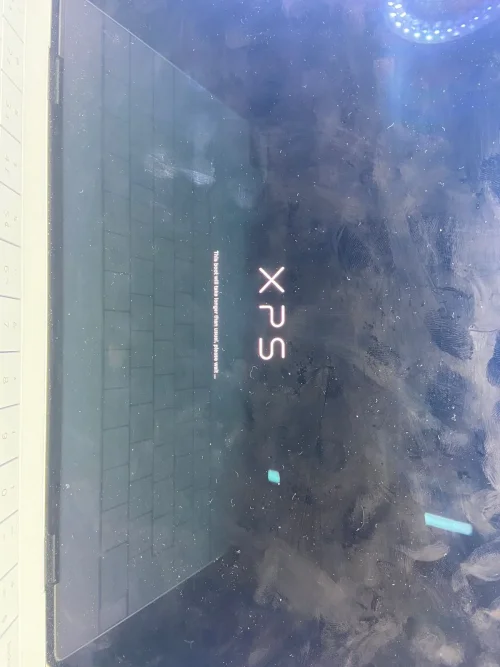
I have a Dell XPS 13 9340 (Intel Core Ultra) that is stuck at the XPS logo screen.

Current symptoms:

  • Stuck on the XPS logo indefinitely.
  • Message displayed: "This boot will take longer than usual, please wait..."
  • F2 BIOS Setup does not work.
  • F12 Boot Menu does not work.
  • Removing the SSD makes no difference.
  • The system behavior remains exactly the same without the SSD installed.

What I have already done:

  • Read and backed up all SPI chips from the motherboard.
  • Main BIOS dump: 64 MB.
  • UTS1 dump: 1 MB.
  • UTS2 dump: 1 MB.

I also extracted the official Dell BIOS package version 1.26.0 and obtained:

  • System BIOS with BiosGuard v1.26.0 (32 MB)
  • Intel Management Engine Corporate Firmware Update v18.0.18.2659 (11.8 MB)

The official files appear to be valid.

Could someone please check the 64 MB dump and determine:

1. Whether the BIOS region is corrupted.
2. Whether the Intel ME region is damaged or requires cleaning.
3. If the BIOS needs to be rebuilt using the official Dell BIOS v1.26.0.
4. If NVRAM corruption could be causing the boot hang.
5. Whether the Service Tag, UUID, and OEM data should be transferred into a rebuilt image.

My goal is to obtain a repaired/rebuilt 64 MB BIOS image while preserving the machine-specific data.

Thank you very much for any help.
 

Attachments


BIOS DELL XPS.bin
64 MB · Views: 6

Hello everyone,

I have a Dell XPS 13 9340 (Intel Core Ultra) that is stuck at the XPS logo screen.

Current symptoms:

  • Stuck on the XPS logo indefinitely.
  • Message displayed: "This boot will take longer than usual, please wait..."
  • F2 BIOS Setup does not work.
  • F12 Boot Menu does not work.
  • Removing the SSD makes no difference.
  • The system behavior remains exactly the same without the SSD installed.

What I have already done:

  • Read and backed up all SPI chips from the motherboard.
  • Main BIOS dump: 64 MB.
  • UTS1 dump: 1 MB.
  • UTS2 dump: 1 MB.

I also extracted the official Dell BIOS package version 1.26.0 and obtained:

  • System BIOS with BiosGuard v1.26.0 (32 MB)
  • Intel Management Engine Corporate Firmware Update v18.0.18.2659 (11.8 MB)

The official files appear to be valid.

Could someone please check the 64 MB dump and determine:

1. Whether the BIOS region is corrupted.
2. Whether the Intel ME region is damaged or requires cleaning.
3. If the BIOS needs to be rebuilt using the official Dell BIOS v1.26.0.
4. If NVRAM corruption could be causing the boot hang.
5. Whether the Service Tag, UUID, and OEM data should be transferred into a rebuilt image.

My goal is to obtain a repaired/rebuilt 64 MB BIOS image while preserving the machine-specific data.

Thank you very much for any help.
Try this one Just write this main bios 1mb use old origional
 

Attachments

buildss.BIN.zip
18.9 MB · Views: 12

Try this one Just write this main bios 1mb use old origional
The system is still stuck on the XPS logo screen displaying 'This boot will take longer than usual, please wait...' and never progresses beyond that point
 

Attachments

Dell XPS 13 9340 JDP30 LA-L723P – WhatsApp Image 2026-06-18 at 18.34.26

Make PKBIOSFIX part of your bench.

Professional resources. Shared experience. A stronger repair community.

Explore PRO
Back
Top