
Can you fix my BIOS file? My Wyse 3040 won't boot into the BIOS; it gets stuck on the logo.
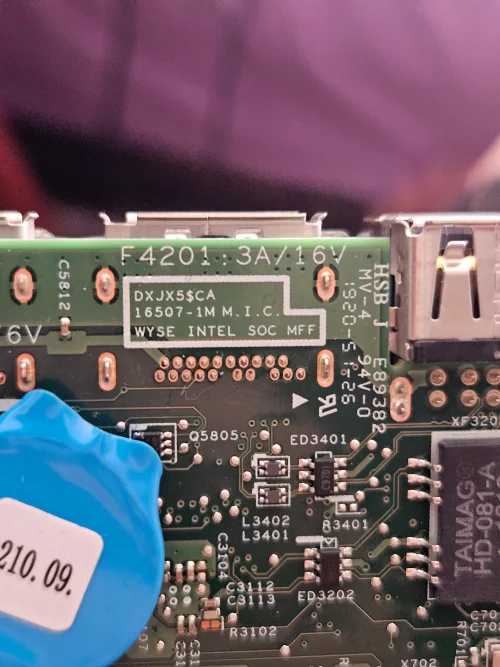
Here is my board's serial number: 16507-1M M.I.C. DXJX5$CA / WYSE INTEL SOC MFF.
The chip serial number is Winbond 25Q128FWSQ.
I tried using a dump file from this thread: DELL - DELL WYSE 3040 MOTHERBOARD DXJX5$CA 16507-1M - PKBIOSFIX, but only the indicator light turns on—there is no display on the screen.
I have attached my original backup file; could you please fix it? I really need your help urgently.
Here is my board's serial number: 16507-1M M.I.C. DXJX5$CA / WYSE INTEL SOC MFF.
The chip serial number is Winbond 25Q128FWSQ.
I tried using a dump file from this thread: DELL - DELL WYSE 3040 MOTHERBOARD DXJX5$CA 16507-1M - PKBIOSFIX, but only the indicator light turns on—there is no display on the screen.
I have attached my original backup file; could you please fix it? I really need your help urgently.
About this board
This thread is for the Dell Wyse 3040.
Compare the board number printed on the PCB (near the RAM slots or under the battery) with the files before you flash.
What this thread covers
- BIOS (full SPI chip dump, .bin)
Common cases: dead board after an interrupted BIOS update, ME region errors, missing serial number or UUID after a board swap, or a password lock.
Before flashing, always read and save the original chip. It holds the serial number, UUID, MAC address and ME data for that exact machine.
Have a tested file for this board? Reply below and help the next technician. Looking for something else? Search all files in the File Finder.
Attachments
BIOS Backup Wyse 3040.bin
16 MB · Views: 0
16 MB · Views: 0


