A community for the repair bench. Since 2022.LAPTOP + DESKTOP BOARD REPAIR
Advertisement
Service · EC / KBC unlock Unlock MEC17xx, Nuvoton & ITE with a BIOS patch
  • BIOS patch method
  • Private check
  • For verified owners & repair technicians
Chat on WhatsApp +92 328 0493988 · Replies on WhatsApp
Service · Dell BIOS password Dell master BIOS codes from your System Number
  • Suffixes 8FC8 CF1B 3FE2 9ABE 1B58 E7A8
  • Private check
  • For verified owners & repair technicians
Chat on WhatsApp +92 328 0493988 · Replies on WhatsApp

BIOS ASUS TUF Gaming F15 FX507 A01/A03 BIOS & Boardview

Laptops and Desktop Bios, Schematic and Boardview Files And Repairing Discussion
Search files by board code
Browse all 33,247 files →
File inventory
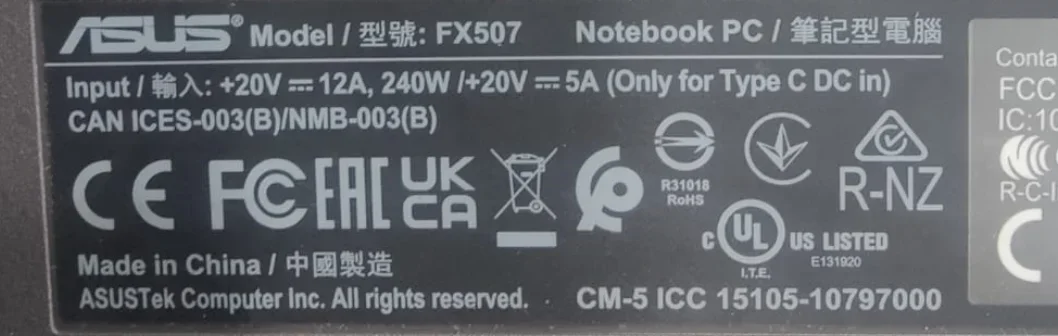
  • Model: ASUS TUF Gaming F15 FX507 series
  • BIOS board: FX507-MP-GBM, 6050A3437302-MB-A01
  • Files included: BIOS archive plus CAD boardview
  • Boardview reference: FX507VU 6050A3467101-MB-A03
  • Verification: The BIOS and boardview reference different board revisions; confirm the exact board code before use
Always back up the original chip and verify the exact board code and flash size before programming.

FX507-MP-GBM 6050A3437302-MB-A01
Bios
Asus TUF Gaming F15 FX507 (2023) FX507VU Inventec FX507-MP-GBM7VV 6050A3467101-MB-A03 BoardView
 
About this board

This thread is for the Asus TUF Gaming F15 FX507.

Compare the board number printed on the PCB (near the RAM slots or under the battery) with the files before you flash.

What this thread covers
  • BIOS (full SPI chip dump, .bin)
  • Boardview (.brd / .bdv / .cad)

Common cases: dead board after an interrupted BIOS update, ME region errors, missing serial number or UUID after a board swap, or a password lock.

Before flashing, always read and save the original chip. It holds the serial number, UUID, MAC address and ME data for that exact machine.

Have a tested file for this board? Reply below and help the next technician. Looking for something else? Search all files in the File Finder.

Attachments

6050A3437302.rar
10 MB · Views: 24


Last edited:
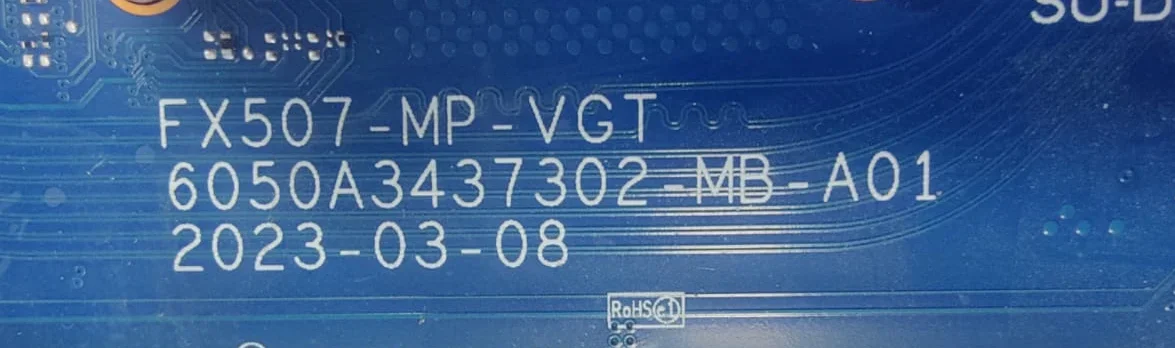
ASUS FX507 FX507VI-F15 FX507 MP VGT 6050A3437302-MB-A01
Hey! I have this laptop that you have uploaded tested okay bios with same processor SRMJ0
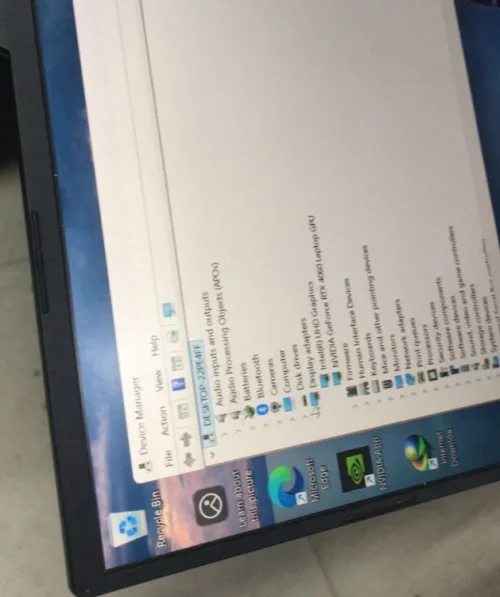
I replace the ec chip and laptop still no power and then i check the main bios is also corrupted and i have tried many bios from vinafix and badcaps now my laptop is working fine but not showing the graphic card.
I have tried your bios that admin uploaded on post no 2 tested okay bios but stil have the same condition.
I have checked all the main board and there is no fault in the board i assure that the problem must in bios that is why i have upgraded my account to vip here.
I have checked you guys talk about factory image and solved many problems.
Can you guys help me in this matter? I am uploading the working bios
 

Attachments


ASUS FX507 FX507VI-F15 FX507 MP VGT 6050A3437302-MB-A01
Hey! I have this laptop that you have uploaded tested okay bios with same processor SRMJ0
I replace the ec chip and laptop still no power and then i check the main bios is also corrupted and i have tried many bios from vinafix and badcaps now my laptop is working fine but not showing the graphic card.
I have tried your bios that admin uploaded on post no 2 tested okay bios but stil have the same condition.
I have checked all the main board and there is no fault in the board i assure that the problem must in bios that is why i have upgraded my account to vip here.
I have checked you guys talk about factory image and solved many problems.
Can you guys help me in this matter? I am uploading the working bios
Yes we can build factory bios for you. just confirm that the mode is same as in post no 2?
 
BIOS Chip: 25R256JVEN
Laptop Model: FX507VU-LP180W
SN: S2NRKD00325208E
CN: C63W
MFD: 2024-02

Mainboard Model: FX507-MP-GBM 6050A3437302-MB-A01 2023-03-08.

There is a QR code on the board accompanied by the following code:
3451330
CDE42M2005S

It attempts to power on, but the battery LED just keeps flashing. Here is the sequence of events:

1. The startup sequence begins with white lights, and the battery LED turns on for a few seconds.
2. Then, the battery LED starts flashing and continues to do so for a couple of minutes.
3. The keyboard backlight turns off, but the LED continues to flash.
4. All LEDs turn off completely; after a while, they turn back on, and the whole process repeats.
5. Once it restarts and the battery LED begins flashing, it stays that way indefinitely—it no longer turns off—though if I press the power button, it eventually shuts down.

- At no point do the fans spin, nor does the CPU heat up. The battery is disconnected the entire time.

- I would like assistance in recreating the BIOS using the VirtualBios tool.
Read old bios and upload here
 
Read old bios and upload here
The laptop has already been to a repair shop, but they couldn't fix it. I’m not sure if the original BIOS has been tampered with; I suspect it might not be the original, even though the BIOS file I’m uploading contains the correct serial numbers and all other data—it’s possible they flashed a modified BIOS that includes the actual device details, without restoring the original backup. I am attaching my own backup, which I created after getting the device back from the repair shop.
 

Attachments

backup 25R256JVEN.bin
32 MB · Views: 1

The laptop has already been to a repair shop, but they couldn't fix it. I’m not sure if the original BIOS has been tampered with; I suspect it might not be the original, even though the BIOS file I’m uploading contains the correct serial numbers and all other data—it’s possible they flashed a modified BIOS that includes the actual device details, without restoring the original backup. I am attaching my own backup, which I created after getting the device back from the repair shop.
Try this
 

Attachments

builds.rar
10.4 MB · Views: 1

Make PKBIOSFIX part of your bench.

Professional resources. Shared experience. A stronger repair community.

Explore PRO
Back
Top