
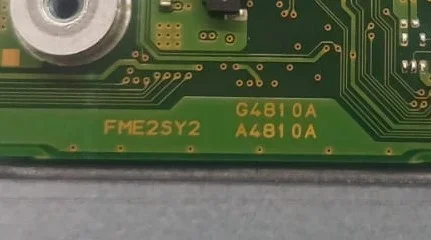
DYNABOOK TECRA A40-K FME2SY2 A4810A
CLEAN ME BIOS
CPU Generation: Raptor Lake (12th Gen)
CSME Version: 16.1.25.2157
File System Stage: Configured
SRLD9 (Intel Core i5-1240P)
FIXED SLOW BOOT
TESTED IMRANROMI
CLEAN ME BIOS
CPU Generation: Raptor Lake (12th Gen)
CSME Version: 16.1.25.2157
File System Stage: Configured
SRLD9 (Intel Core i5-1240P)
FIXED SLOW BOOT
TESTED IMRANROMI
About this board
Files for the Dynabook Tecra A40-K FME2SY2 A4810A motherboard.
Compare the board number printed on the PCB (near the RAM slots or under the battery) with the files before you flash.
Files usually needed for this board
- BIOS (full SPI chip dump, .bin)
- EC / KBC firmware, if the board uses a separate EC chip
- Schematic (PDF)
- Boardview (.brd / .bdv / .cad)
Common cases: dead board after an interrupted BIOS update, ME region errors, missing serial number or UUID after a board swap, or a password lock.
Back up the original dump first — it contains machine-specific data (serial, UUID, MAC, ME), and you will want it if anything goes wrong.
If you have a working file for this board, please share it below. More files: search Dynabook Tecra A40-K FME2SY2 A4810A in File Finder.
Attachments
DYNABOOK TECRA A40-K FME2SY2 A4810A CLEAN ME.rar
12.3 MB · Views: 14
12.3 MB · Views: 14


